How to use this collection
Use this collection when product data problems are blocking Shopping campaigns, free listings, product comparison surfaces, or feed QA work.
Start with the page that matches the decision in front of you. Use calculators for numbers, guides for context, and templates when the work needs to be handed to a teammate, agency, or future review.
What to fix first
Start with warnings that affect eligible products, paid Shopping campaigns, or high-revenue product families. A warning affecting ten top-selling variants usually deserves attention before a low-impact attribute cleanup affecting hundreds of dormant SKUs.
| Signal | Priority | Best first page |
|---|
| Products disapproved or limited in campaigns | High | Issue decoder or disapproval priority sorter |
| Price, availability, or shipping mismatch | High | Mismatch checker and QA sheet |
| Missing identifiers on known branded products | Medium to high | GTIN guide and research log |
| Weak titles or category mapping | Medium | Title scorecard or taxonomy mapper |
| Recurring app sync issues | Medium | Feed refresh diagnostic and weekly review template |
How the collection should be used
Use tools for a current warning, examples for a familiar situation, guides for the repair path, comparisons for choosing the right workflow, and templates when the fix needs to be handed to a teammate or vendor.
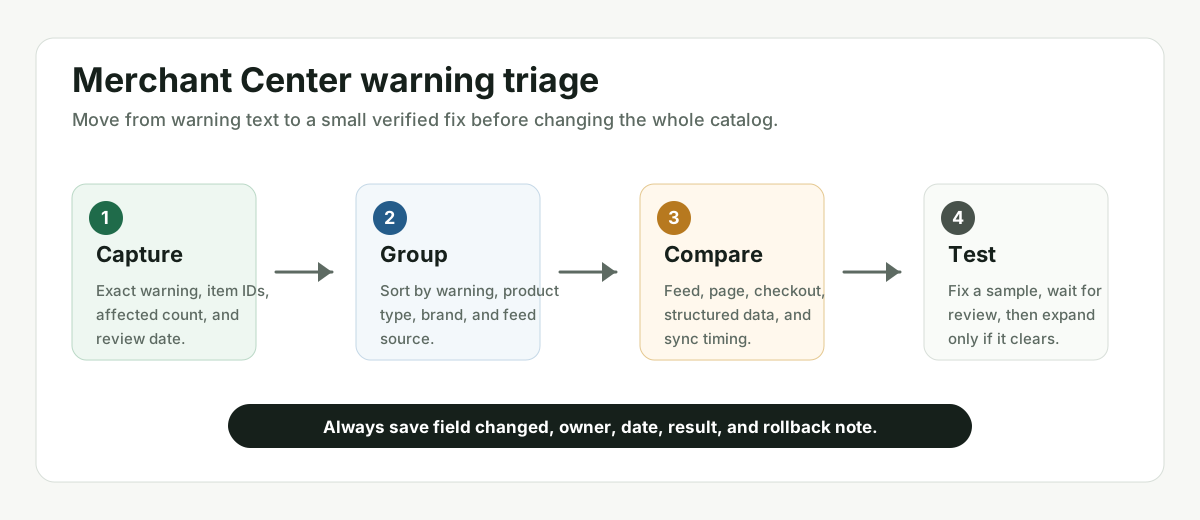
The safest pattern is sample first, scale second. A small verified fix teaches the team more than a broad rule that creates new warnings across the catalog.